
Simple Effective Eay of Inserting And Deleting Cells

Introduction

By the end of this lesson, you should be able to:

  • Insert cells
  • Delete cells

Inserting cells

When working in an Excel worksheet, you may need to insert or delete cells without inserting or deleting entire rows or columns.

To insert cells:

  • Select the range where new cells should be inserted.
  • Right-click and select Insert.
  • The Insert dialog box opens and presents the following four choices:
    • Shift cells right: The cells in the same row are shifted right.
    • Shift cells down: Selected cells and all cells below them in the same column are shifted.
    • Entire row: This inserts an entire row of cells.
    • Entire column: This inserts an entire column.
  • Choose an option, then click OK.
  • Your result displays in the spreadsheet.
Important pointYou can also use the Insert and Delete dialog boxes to insert and delete columns and rows.
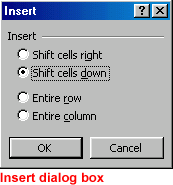
Insert Dialog Box

Deleting cells

To delete cells:

  • Select one or more cells.
  • To delete cell contents but leave the cell in place, press Delete.
OR
  • Right-click and choose Delete.
  • The Delete dialog box opens and presents the following choices:
    • Shift cells left: Cells in the same row are shifted right.
    • Shift cells up: Selected cells and all cells below them in the same column are shifted.
    • Entire row: This deletes an entire row of cells.
    • Entire column: This deletes an entire column.
  • Choose an option, then click OK.
  • Your result displays in your spreadsheet.
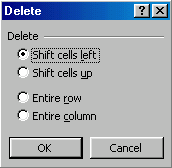
Delete Dialog Box

Comments

Popular posts from this blog

Typography Glossary: 50 Essential Typography Terms Every Beginner Should Know

Introduction Typography is everywhere—from websites and mobile apps to posters, logos, and business documents. Understanding common typography terms can help you choose better fonts, create more readable designs, and communicate your message more effectively. In this beginner-friendly glossary, you'll learn 50 essential typography terms explained in simple language, with everyday examples to help them stick. Whether you're a student, designer, content creator, or business owner, these terms will help you understand the basics of modern typography. What Is Typography? Typography is the art and technique of arranging text so that it is easy to read and visually appealing. It includes the selection of fonts, spacing, alignment, size, and overall text layout. Think of it as the difference between a page of text that's a chore to read and one that just flows. Why Typography Matters Improves readability — the right spacing and font make text easier to scan quickly ...

The Advanced Guide to Colours In Graphic Design

The power of color Color plays a vital role in  design  and  everyday life . It can draw your eye to an image. Sometimes it can trigger an emotional response. It can even communicate something important without using words at all. So how do we know which colors look good together and which ones don't? The answer is simple:  Color theory . Artists and designers have followed  color theory  for centuries, but anyone can learn more about it. It can help you feel confident in many different situations, whether it's  choosing colors for a design  or  putting together the perfect outfit . With a little insight, you'll be looking at color in a whole new way. Color basics Let's start at the beginning with a refresher on the basics. Remember learning about  primary and secondary colors  in school? Then you already have some knowledge of color theory. Secondary colors  are created by combining two  primary colors...

The Ultimate Cheat Sheet On Making Basic Adjustments In Image Editting

Introduction Image editing is all about adjusting your images to make them look better. We're going to talk about some of the most  basic image adjustments , along with some common problems to watch out for when making these changes. The adjustments we'll cover in this lesson include: Cropping : If you want to remove parts of an image, you can  crop  it. You can think of cropping as using a pair of scissors to  cut out  the parts you no longer want. Resizing : If you want to make an image smaller or larger, you can  resize  it. However, keep in mind that making an image larger than its original size generally does not look good. Rotating : If you want to change the  orientation  of an image, you can  rotate  it to the left or right. Optional : If you'd like to follow along, you can download some or all of our  example images . Just click any of the images below to open a full-sized version. Then right-click the full-si...